
Motivation
I play guitar. Certainly not as much as I used to.
I don’t have enough time.
Except, maybe, actually, I do. I certainly can squeeze 10 minutes even now!
Wouldn’t it be great to have a mate who plays drums right there, ready to jam 24/7?
Yes, I gave drum MIDI patterns a go.
I have some decent libraries, and yes, it can be fun at times,
but it’s also tedious and kind of unsurprising,
especially when you find yourself stuck in a guitar solo on the same drum loop for an hour.
What I wanted was a drum machine that would actually listen to what I was playing and respond sensibly, evolving over time with me. In a word, I wanted a drum machine that can jam.
What I ended up building taught me a lot about audio processing, machine learning, and how deceptively hard it is to define “sounds good together”.
This is the story of how it came to be.
The core idea
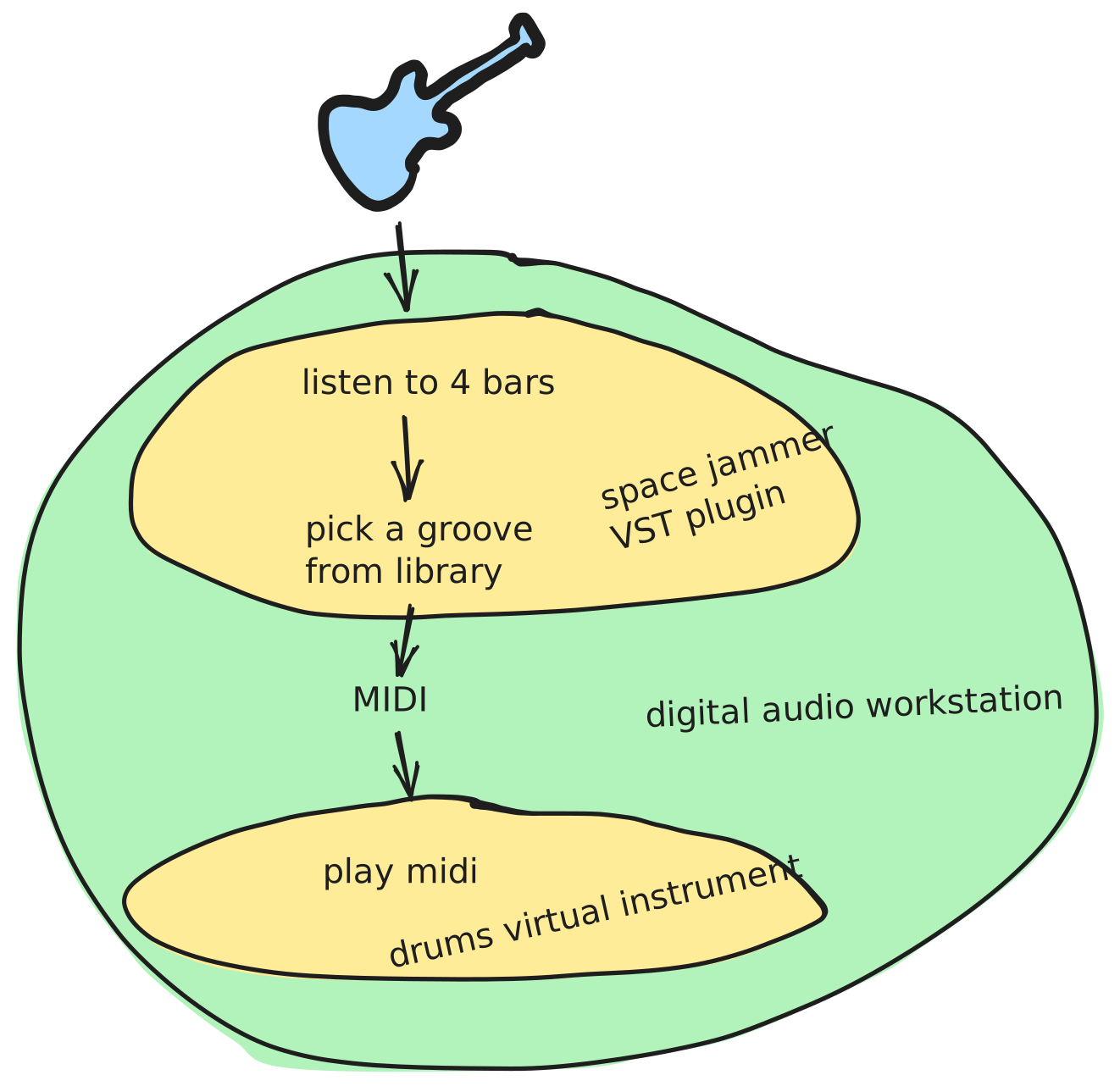
Space Jammer is an audio plugin, a piece of software that runs inside a
DAW (Digital Audio Workstation), which is the recording studio
software musicians use to produce music in the digital era; Ableton Live and Reaper are popular examples.
Plugins extend the DAW with extra instruments or effects,
much like browser extensions extend a web browser.
You plug in your guitar, hit record, and Space Jammer generates matching drums in real time.
The drums are composed as MIDI, a standard format
that doesn’t carry actual audio, but instead carries instructions:
“hit this drum, at this moment, at this velocity”.
The DAW takes those instructions and plays them back through a virtual drum kit
of your choice.
The core idea is that every four bars, the plugin analyses what you’ve been playing
and picks the best matching pattern from a library of drum grooves.
The result plays back immediately, in sync with your tempo.
Part 1: Audio analysis
Before anything else, I needed to understand what the plugin was actually going to work with: the audio signal itself, the guitar.
What is an audio signal?
When a microphone records sound, it measures tiny changes in air pressure
thousands of times per second (typically 44,100 times per second, 44.1 kHz).
Each measurement, called a sample, is just a number representing
how far the air pressure is above or below silence at that instant.
Because sound is a wave (air pushing forward, then pulling back) these
numbers oscillate above and below zero.
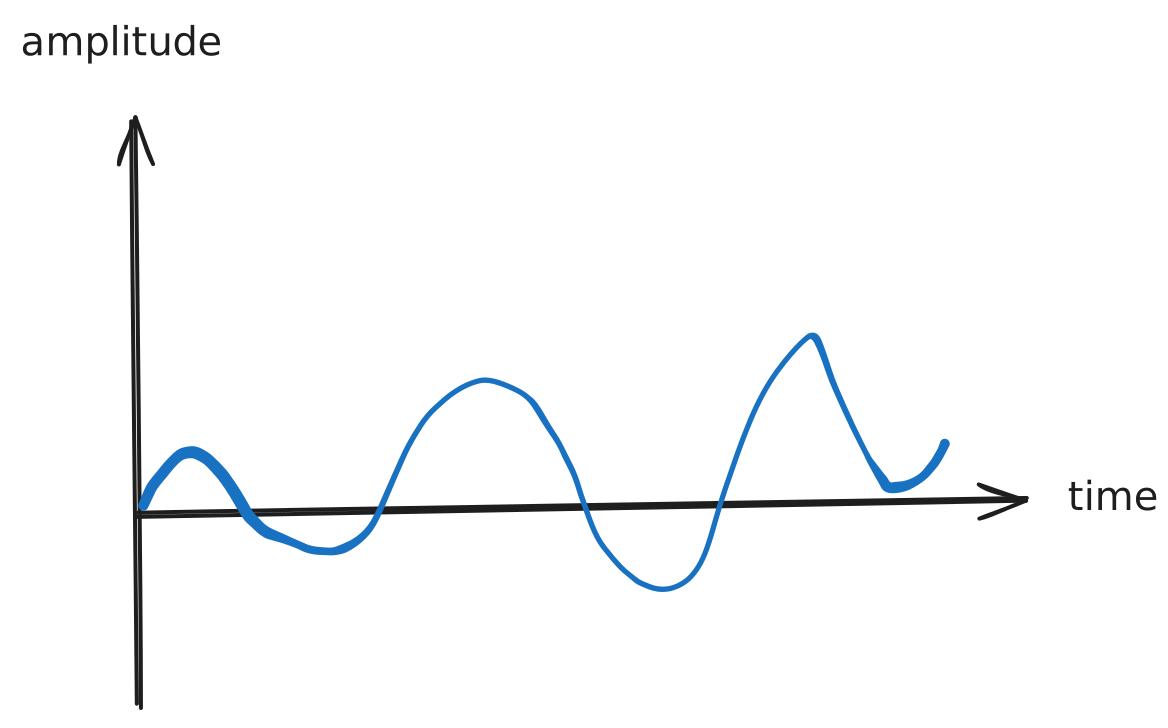
You could do some useful things with samples directly. The overall loudness at any moment is just the magnitude of these numbers. You can crudely detect when the guitar is being played versus silent, or even sketch a rough rhythmic envelope by tracking how volume rises and falls over time.
But loudness is a very coarse description of a sound.
Two completely different guitar performances can have the same volume profile.
To understand what is actually being played, not just how loud it is,
you need to go deeper.
The frequency domain
Think about what it means to play an A note on the guitar. The string
vibrates at 110 times per second (110 Hz) — that’s the fundamental frequency.
But it also vibrates at 220 Hz, 330 Hz, 440 Hz, and so on: the harmonics.
Each vibration pushes air, which pushes the microphone, which produces a number
that oscillates at all those rates at once. The result is a complex waveform,
and it’s that specific blend of harmonics that gives a
guitar its characteristic sound, distinct from a piano or a violin playing the
same note. The pitch you perceive is the fundamental, but the timbre is shaped
by everything else. Different notes are just different fundamental rates, and a
chord is several of them happening simultaneously.
Raw samples don’t make this visible. To see which pitches are present at
any moment, you need to decompose the signal into its constituent
frequencies.
This is called the frequency domain,
as opposed to the time domain of the raw samples.
The mathematical tool for this is the Fast Fourier Transform (FFT). You feed it a short slice of audio (say, 1024 samples), and it tells you how much energy is present at each frequency: how much at 100 Hz, how much at 500 Hz, how much at 5 kHz, and so on.
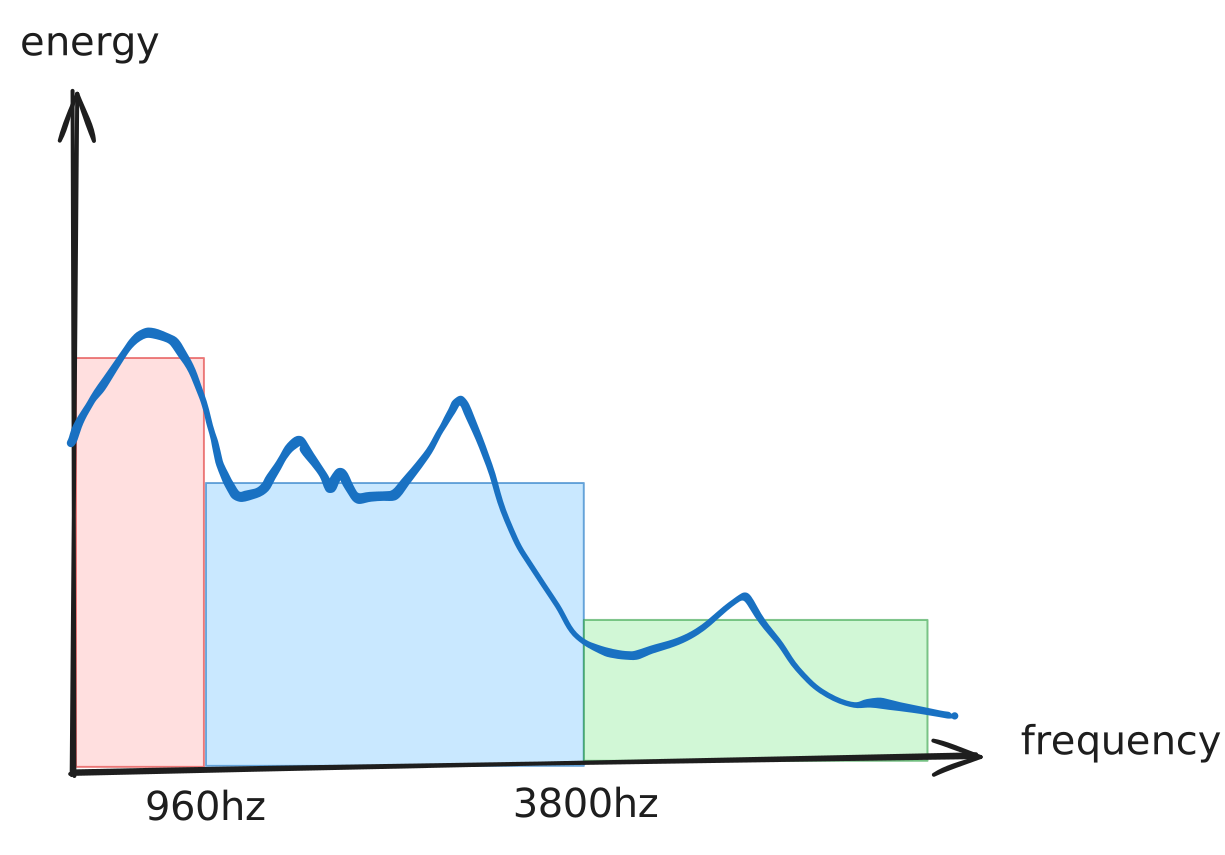
Run the FFT repeatedly on overlapping windows as the audio plays, and you
get a continuous picture of how the frequency content evolves over time:
which pitches appear, which fade, which burst in suddenly.
This is called a spectrogram, and it reveals structure that is completely invisible in
the raw waveform: you can see a chord change, a pick attack, the decay of
a note, the onset of distortion.
This is the foundation everything else is built on.
Detecting events
When you strum a guitar chord, the spectral content changes suddenly and dramatically. The technique Space Jammer uses to detect this is called spectral flux: for each frequency band, measure how much the energy changed compared to the previous frame. A big positive jump means something just happened. That’s an onset.
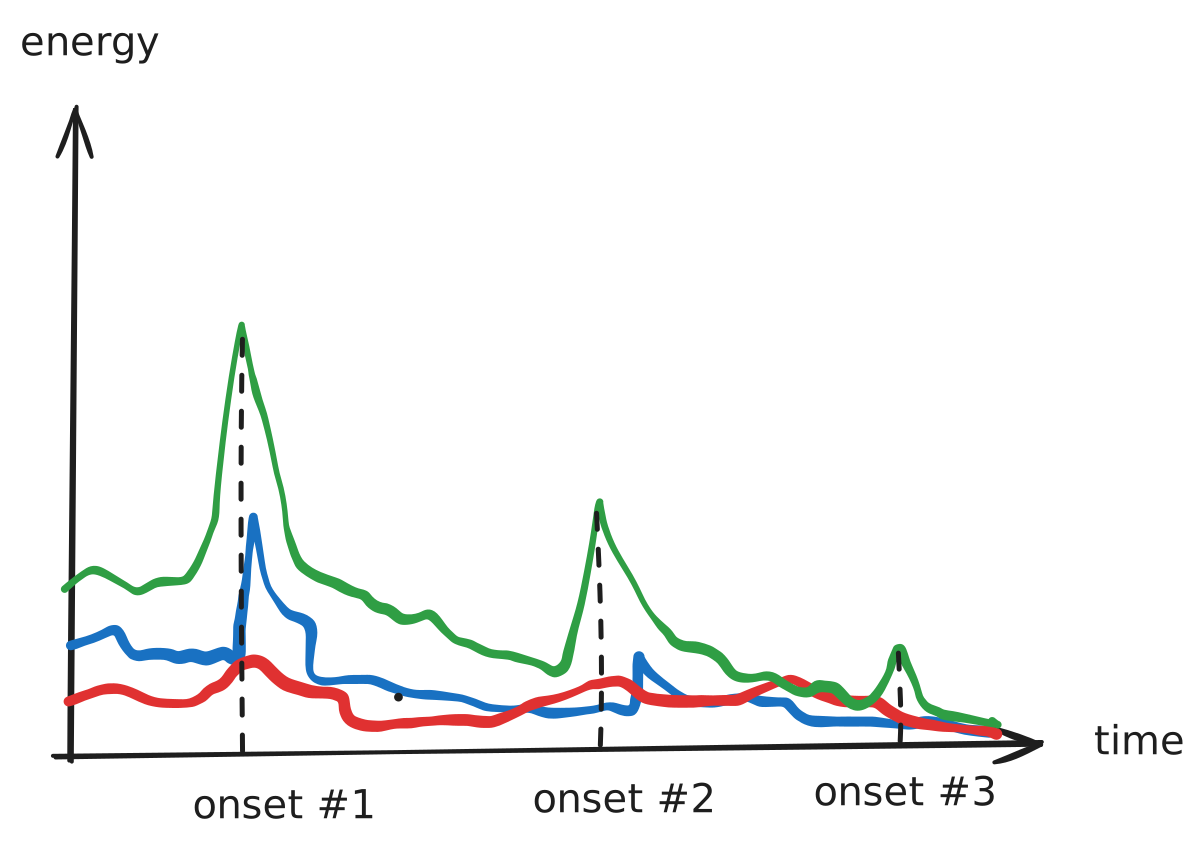
By collecting onsets across several bands, the plugin builds a picture of the rhythmic “skeleton” of what you’re playing: when did things happen, how strong were they, and in which frequency range?
Timbre and playing style
Rhythm tells you when things happen. But two guitar parts with identical
rhythms can feel completely different, and call for completely different drums.
A palm-muted chug played on the low strings and a clean open chord
strummed with the same timing look the same in a rhythm diagram, but no
drummer would play the same groove over both.
This is where the frequency content becomes really useful. Different playing styles leave distinct spectral fingerprints:
Palm mute: muting the strings with the side of the picking hand deadens the sustain and compresses the sound. Energy concentrates heavily in the low frequencies and drops off quickly after each hit. The result is a tight, percussive thud with very little high-frequency content.
Open chord: letting the strings ring freely produces a rich spread of energy across all frequency bands: the fundamental notes in the lows, harmonics building through the mids, and some brightness at the top. The energy also sustains, which shows up as a plateau rather than a sharp spike.
Heavy distortion / fuzz: distortion doesn’t just make things louder, it mathematically clips the signal, which generates a dense cloud of new frequencies above the original notes. The mid-frequency band becomes much fuller and more sustained than a clean signal would ever produce. A fuzz pedal pushed to the extreme essentially turns a guitar into a wall of harmonics.
All of these differences are visible in the spectrogram, and they’re exactly what the fingerprint needs to capture.
The guitar fingerprint
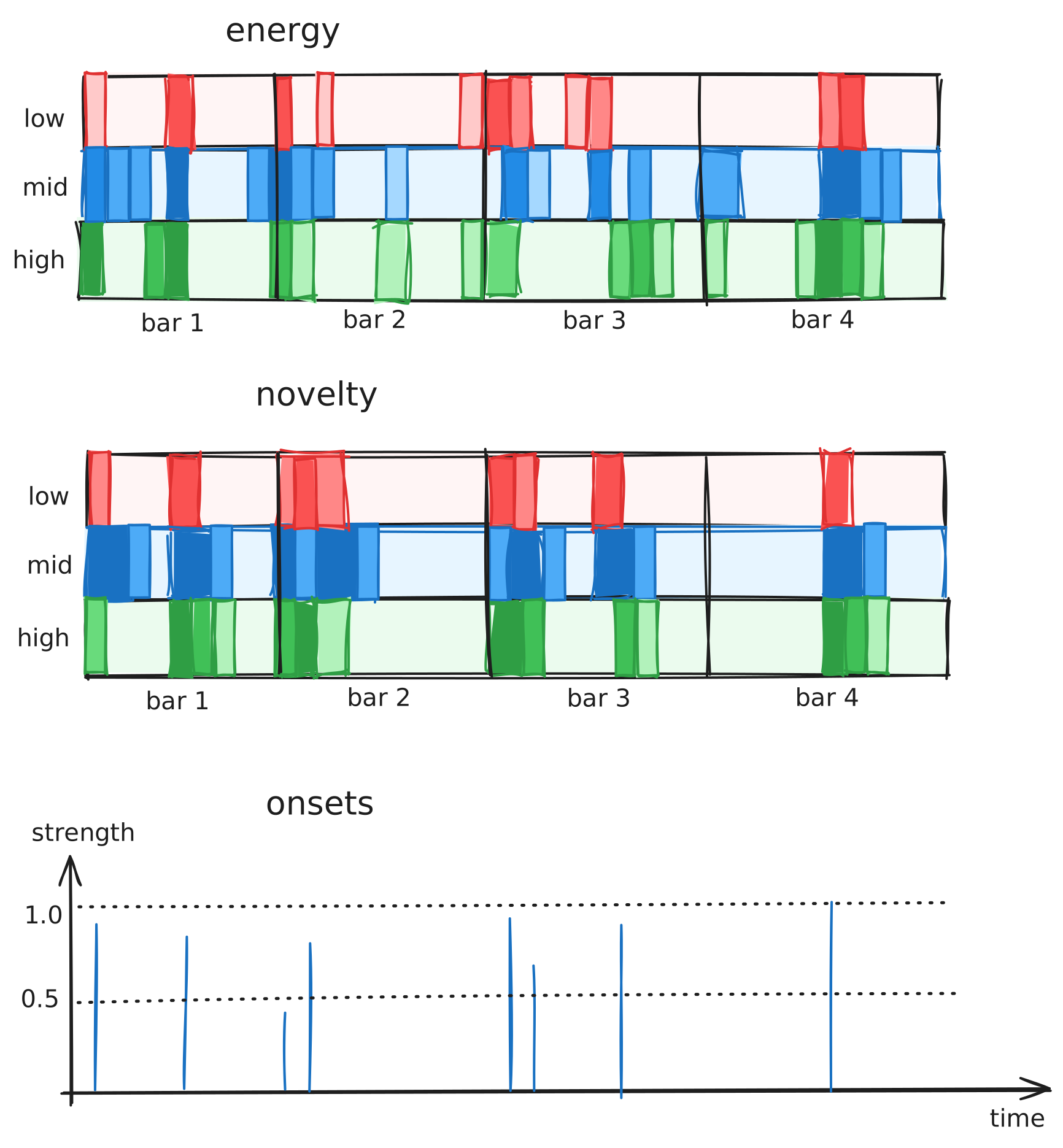
The DAW provides the tempo and time signature, so the plugin knows exactly where each beat and bar falls in the audio stream. This makes it possible to map everything computed so far (energy, spectral change, and onsets) onto a rhythmic grid and produce a compact fingerprint of the last four bars of playing.
The grid has three dimensions: frequency band (low, mid, high), bar (1 to 4), and subdivisions within each beat. The subdivisions use 12 steps per beat — enough resolution to represent both straight 16th notes and triplets, which covers the vast majority of rock and pop rhythms.
Three things get stored in this fingerprint:
- Energy grid: how much energy was present in each frequency band at each rhythmic position — a snapshot of the overall spectral texture
- Novelty grid: how much the energy changed at each position — this captures the attack and movement of the playing, independently of its overall level
- Onset events: the strongest individual hits with their exact timing and strength, preserving fine-grained rhythmic detail that the grid might blur
Part 2: Pattern selection
Now I had a rich description of the guitar signal. The question was what to do with it.
The naive approach
My first instinct was to pick the closest pattern (from a rhythmic point of view). That turned out to be a terrible idea.
The fundamental problem is that guitar and drums complement each other, they don’t mirror each other. A busy, dense riff often sounds best over a simple driving beat that doesn’t compete. A slow, spacious chord progression might want a drum pattern with lots of ghost notes and fills to give it energy. The relationship isn’t imitation, it’s conversation.
And conversations are hard to write down as rules. Every edge case spawns three more. What counts as “busy”? What if the guitar is playing off-beat but the feel is still straight? Does tempo matter? Does the key matter?
Time to think differently.
Machine learning to the rescue
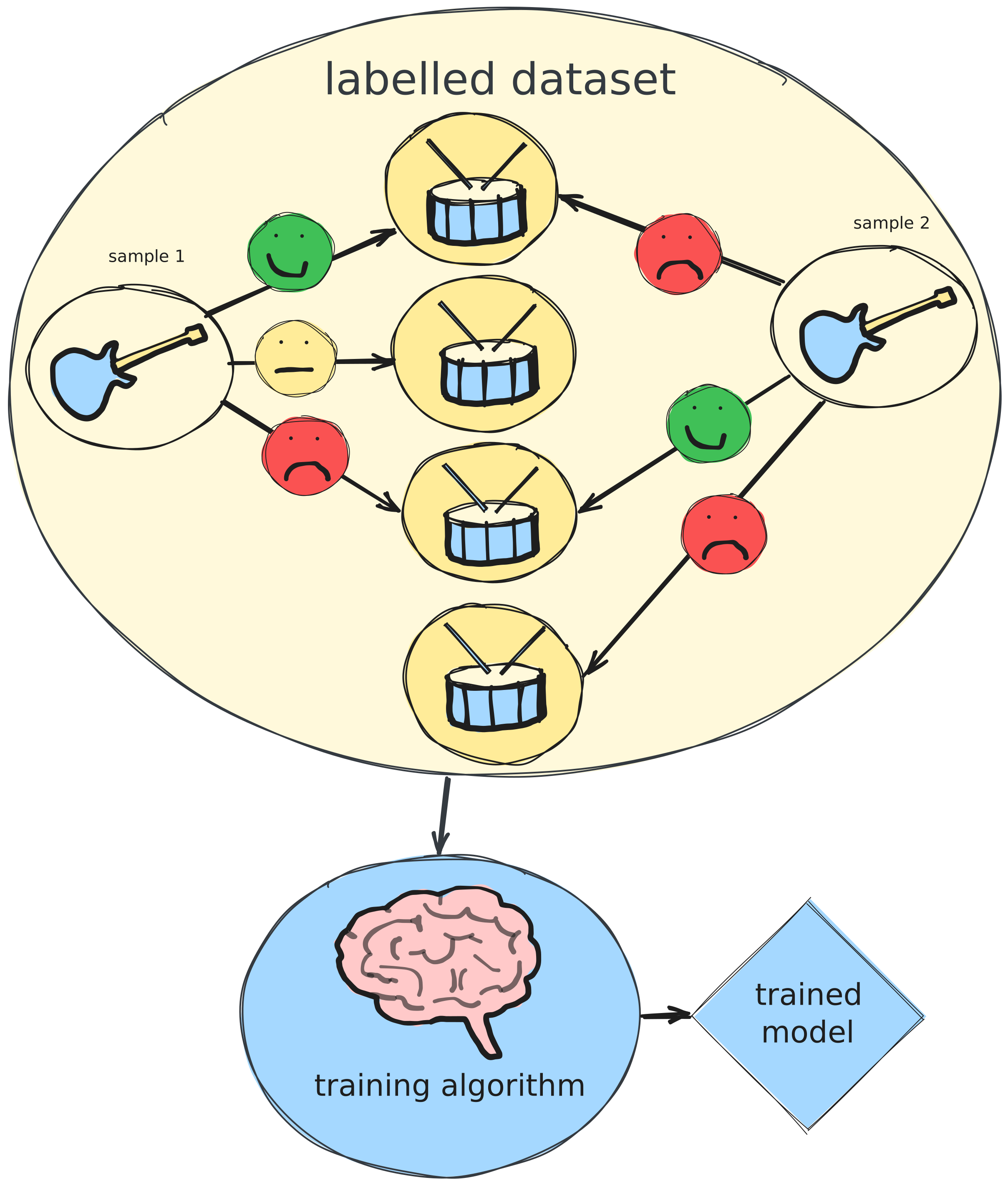
What if instead of trying to describe what makes a good pairing, I just showed a model examples?
This is the core idea behind supervised machine learning: rather than programming a computer with explicit rules, you give it a large number of examples with known correct answers and let it figure out the pattern itself.
In this case, the “examples” are guitar-drum pairings, and the “correct
answer” for each pair is a compatibility score, something like “this
combination sounds great” or “this is a terrible match”.
You sit down, listen to hundreds of pairs, rate them,
and feed all of that to the model.
The model then learns, entirely on its own, what features of the
guitar signal predict a good match with a given drum pattern.
There’s something philosophically interesting here.
The model ends up encoding what “sounds good together” as a mathematical function,
entirely derived from human judgement.
It doesn’t know what a guitar or a drum is.
It doesn’t know what music is.
It just knows that certain patterns of numbers tend to correspond to ratings you gave,
and learns to predict those ratings for new patterns it’s never seen.
The two-tower architecture
The model I ended up with is called a two-tower (or dual encoder), and the intuition behind it is elegant.
Imagine you’re running a matchmaking service. You have two populations (guitar samples and drum patterns) and you want to predict compatibility.
One approach: build a scoring function that takes a guitar sample and a drum pattern and outputs a compatibility score. But this doesn’t scale: with 500 drum patterns and potentially unlimited guitar inputs, you’d need to run the model 500 times for every new guitar snippet.
A better approach: encode each side independently into a shared “taste space”. A guitar riff with a certain character maps to a region of this space. Drum patterns that pair well with it should map to the same region. Finding the best match is then just a nearest-neighbour search.
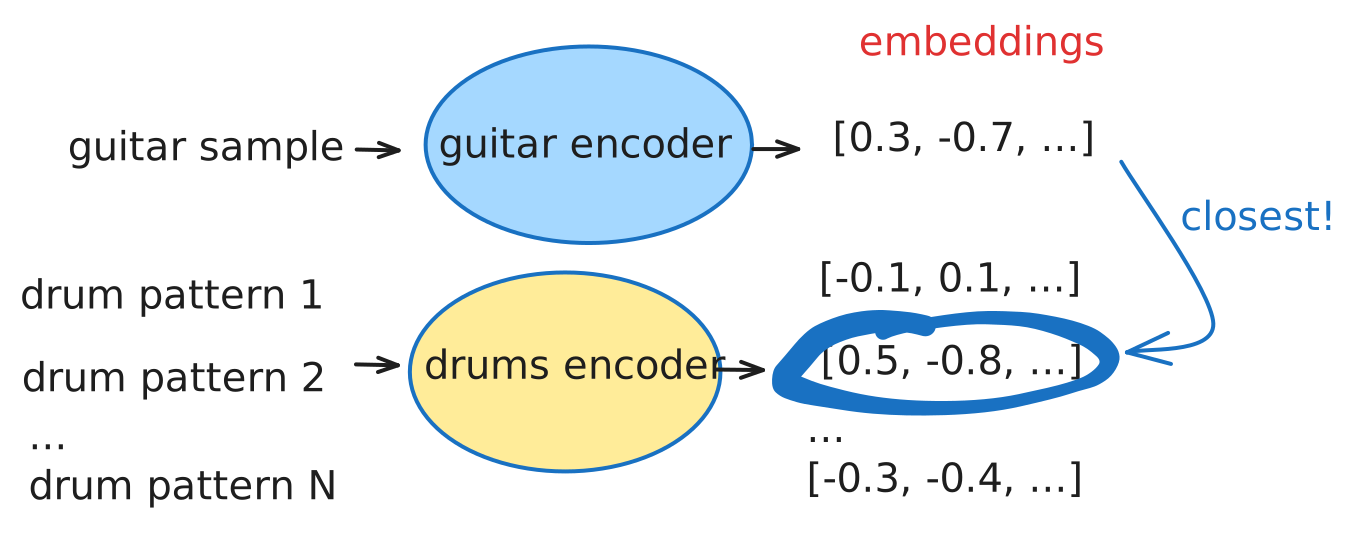
Each encoder is a small neural network (three layers) that learns to compress its input into a 128-dimensional vector. The key is that both encoders share the same output space, so comparing a guitar embedding to a drum embedding is meaningful.
The guitar encoder takes the fingerprint described above as input (the
energy and novelty grids plus the onset events).
The drum encoder takes an equivalent description of the drum pattern extracted from its MIDI data:
a grid called HVO (hit, velocity, offset) from which the model can infer all sort of useful things,
how densely each drum voice plays, how hard it hits, how much of the
energy falls on weak beats (syncopation), and whether the feel is straight
or swung.
Different representations, but same output space.
Collecting training data
To train the model, I needed labelled examples: guitar samples paired with drum patterns, each rated for compatibility.
I built a small labelling tool that plays a guitar loop against a random drum pattern and asks for a score from 0 to 5. I went through this for many combinations. It’s about as tedious as it sounds, but there’s no shortcut: the model can only learn from examples, and the examples have to come from somewhere.
For guitar samples, I used my own recordings plus some publicly available material. For drum patterns, I used the Magenta Groove Dataset — a large library of professionally recorded drum performances.
Data augmentation
A common problem in ML is having too few training examples. The model sees what you showed it and doesn’t generalise well to novel inputs.
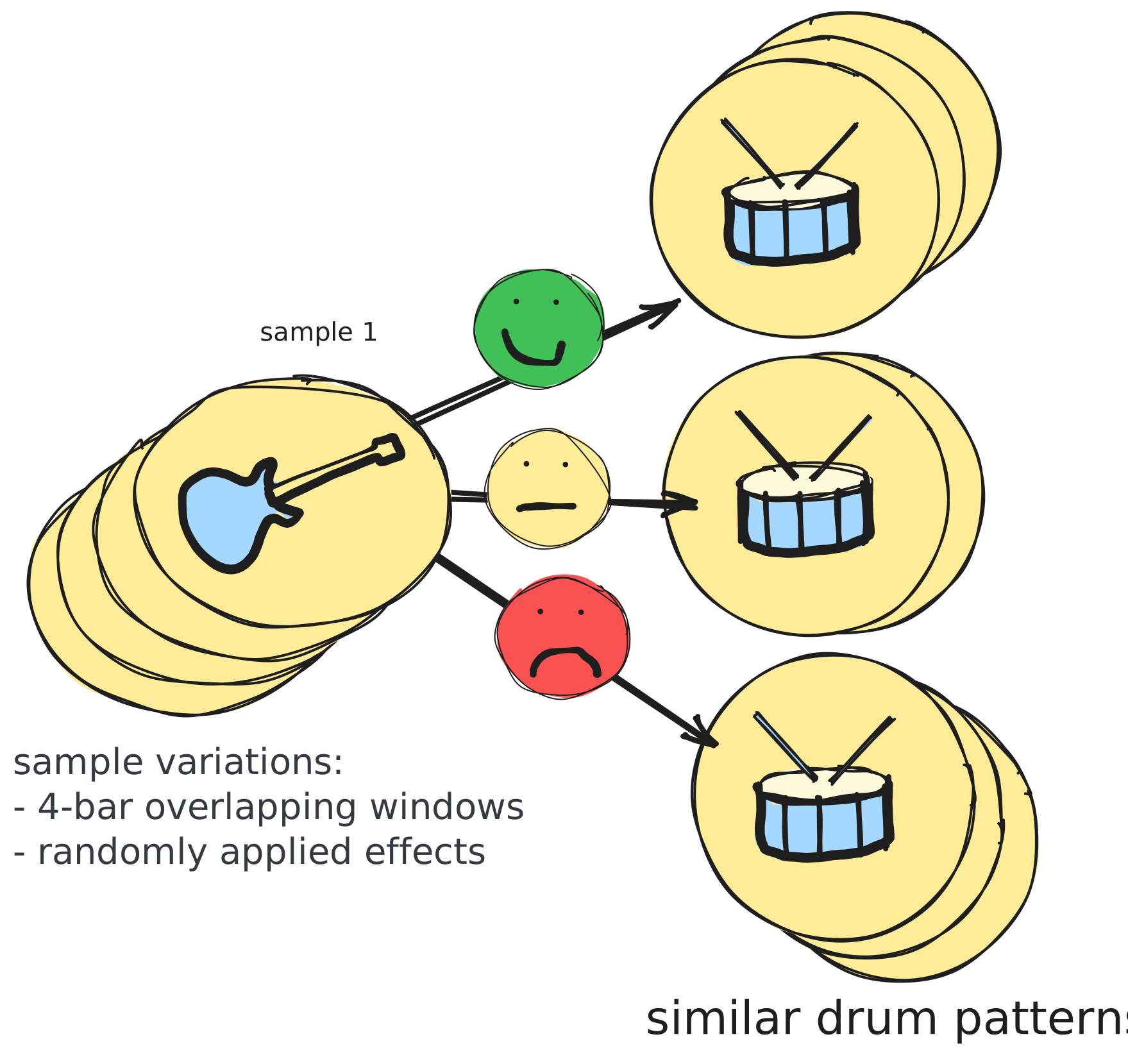
One trick I applied was data augmentation: generating more training examples from the ones I had.
For guitar samples, this meant applying effects (reverb, chorus, compression) and shifting long recordings to different starting points. The underlying content is the same, but the audio looks different enough that the model has to learn deeper structure rather than memorising surface features.
For drum patterns, I expanded the labelled set by finding patterns with similar features
to already-rated ones and inheriting their labels.
If a pattern sounds good (or bad) against a guitar riff, a rhythmically similar pattern probably does too.
Training
The training process uses a technique called contrastive loss. The idea is simple: if a guitar sample and a drum pattern are a good match, their embeddings should end up close together in the 128-dimensional space. If they’re a bad match, they should end up far apart. The loss function measures how well this is satisfied across all the labelled pairs, and nudges the encoders’ internal weights in the right direction after each batch.
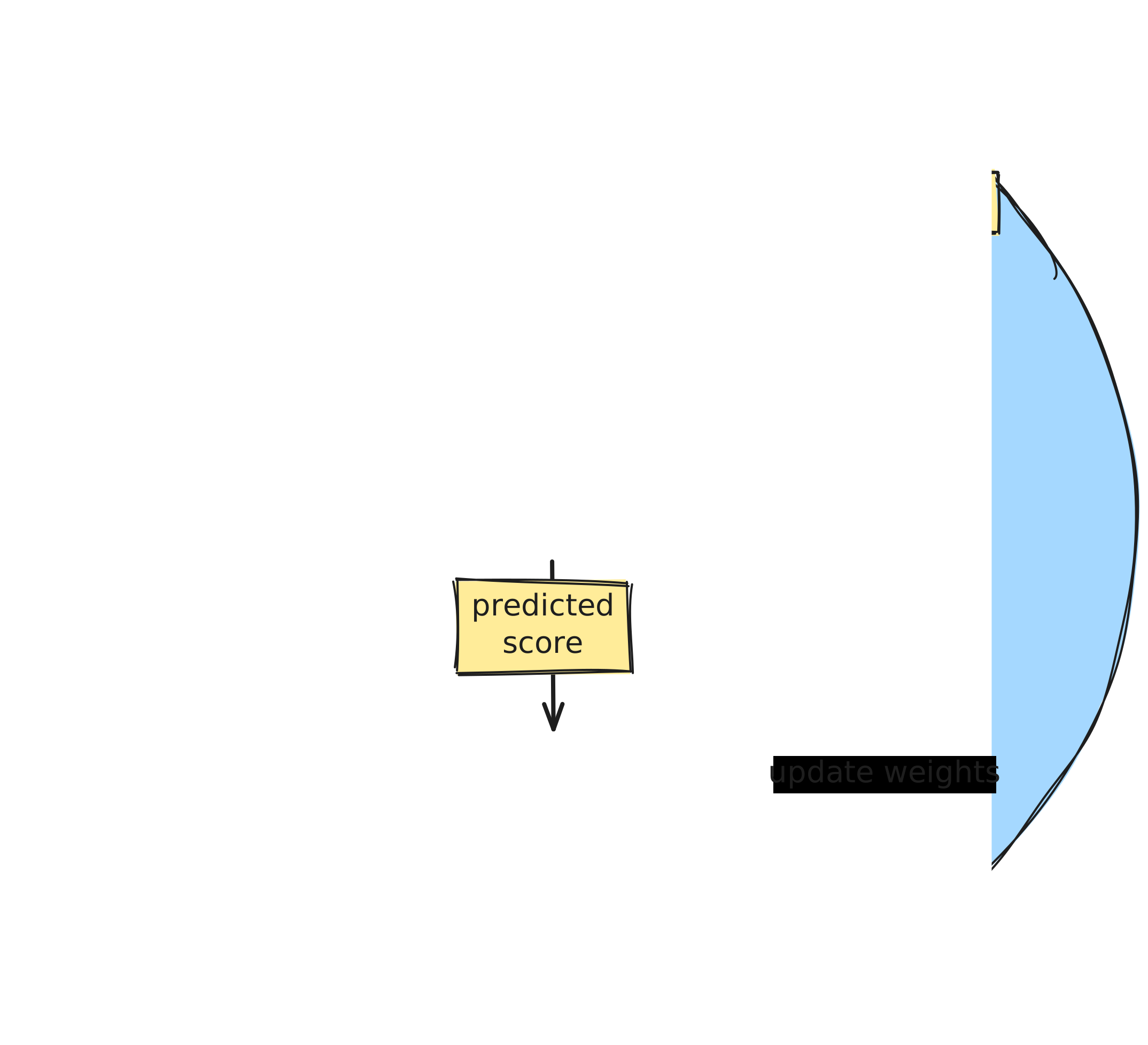
After enough iterations, the 128-dimensional space organises itself around musical compatibility, even though neither encoder was ever told what a guitar or a drum is. The structure emerges entirely from the labels provided.
Plugin architecture
Having a trained model is one thing. Running it inside an audio plugin in real time is another.
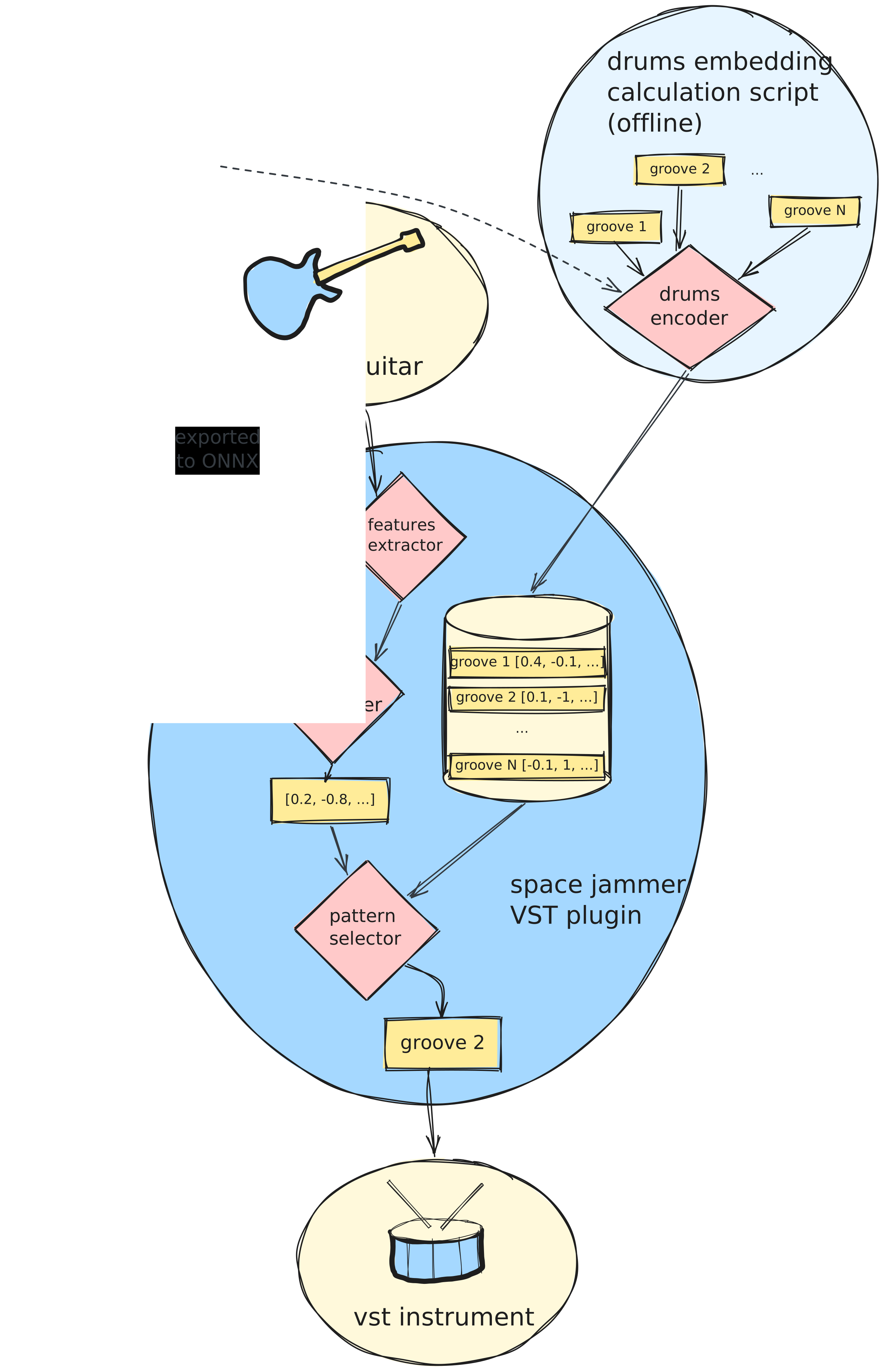
Space Jammer is implemented in Rust using the nih-plug framework, which handles all the low-level VST3/CLAP plumbing. The audio thread processes samples continuously, feeding them through the spectral analyzer and accumulating features. Every time the transport crosses a bar boundary, the pattern selector wakes up.
There’s a practical problem here: the model was trained in Python using PyTorch, but the plugin runs in Rust. The bridge is ONNX, an open standard for representing trained models in a language-neutral format. After training, the guitar encoder gets exported to ONNX and embedded directly into the plugin binary.
The plugin itself is also shipped with a database of grooves including
pre-computed embeddings for each drum pattern.
The guitar encoder runs in real time (it’s tiny - less than 1 MB and runs in about 1 ms).
Finally, the plugin finds the best matching groove using dot product similarity.
Conclusions
Does it sound good? Sometimes.
When it works, it’s genuinely satisfying.
You start playing a riff and the drums lock in in a way that feels natural.
When it doesn’t, it picks something that’s in roughly the right style but with an odd feel,
or it stubbornly stays on the same pattern for too long because the threshold for switching hasn’t been met.
The model is only as good as the training data, and my dataset is small. More varied labelled examples would almost certainly improve it.
The main thing I came away with: the neural network approach is
conceptually much cleaner than trying to hand-code compatibility rules.
The model doesn’t need to know what syncopation is, or what “heavy” means:
it learns the structure from examples.
That’s the real power of the approach.
But data is everything. The elegance of the architecture doesn’t matter if your training set is too small or too narrow.
What’s missing to make this feel like a real musical tool rather than a clever demo:
-
Pattern evolution: right now it jumps between fixed patterns. A real drummer doesn’t do that. They build from a simple groove, add fills, come back down. The next step is some kind of variation engine that can take a selected pattern and produce tasteful variations and fills over time.
-
Training data: I mostly used my own guitar samples to train the model. Of course this trained the model on my style of playing and even my guitar. Even if I partially fixed this through data augmentation, to make this more usable, the model should be trained on a much larger set.
-
Latency improvements: the four-bar window means the drums are always reflecting the last thing you played, not the current moment, and this can feel disconnected. The truth is that the model is not going to predict what I am going to play next, something that an experience drummer would. Overall the plugin in its shape today is entirely lacking that depth.
For what it’s worth, I do jam with it.
It’s rough, and I can hear the gaps, but sometimes it picks something that makes me play differently,
and I end up staying longer than I meant to.
Wasn’t that the whole point anyway?